Understand the Anatomy of a coding project
Before you start building your app with AI, it helps to understand what's actually being built. Vibe coding tools like Lovable let you describe what you want and see it come to life—but under the hood, these tools are generating the same kinds of building blocks used by developers everywhere.
This module helps you understand those building blocks—not so you can write code, but so you can think like a builder. Once you understand how apps are structured, you'll:
- Prompt your AI tools more clearly
- Identify missing parts of your app
- Plan better features
- Collaborate more effectively with other humans (and AIs)
What Makes Up an App?
Whether you're building with code or with AI, most apps are composed of three essential layers:
| Layer | What It Includes | Purpose |
| Frontend | Screens, layout, buttons, inputs (components/, pages/, App.tsx) | What the user sees and interacts with |
| Logic | State management, interactivity (hooks/, utils/, context/) | How the app responds to input, like adding or completing a task |
| Backend | Data handling, APIs, storage (server/, models/, .env) | How the app stores data and connects to services behind the scenes |
These three layers work together through:
- Frontend → Logic: User interactions trigger actions
- Logic → Backend: Data gets stored or retrieved
- Backend → Frontend: Data gets displayed to users
How Components Interact
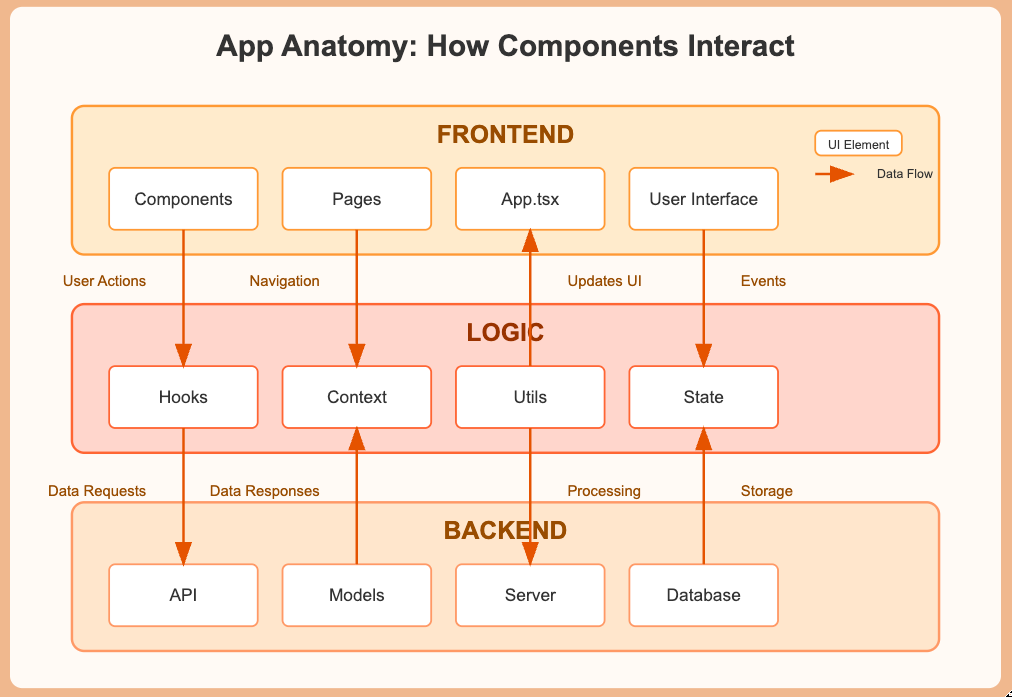
The diagram above visually represents how the three essential layers of any app interact with each other:
- Frontend Layer (what users see and interact with)
- Contains UI components, pages, and the main App file
- Users directly interact with these elements
- Logic Layer (how the app behaves)
- Processes user actions through hooks, context, and utility functions
- Manages application state (like which tasks are complete)
- Forms the "thinking" part of your app
- Backend Layer (where data lives)
- Stores information persistently
- Provides services through APIs
- Handles database operations
The arrows show how these layers communicate: When a user taps a button (Frontend), it triggers an action in the Logic layer. The Logic layer might request data from the Backend. The Backend returns data, which the Logic processes. The Logic then updates what appears on screen in the Frontend.
Understanding these relationships helps you "think like a builder" and create more intentional prompts. Apps aren't just screens but interconnected systems with specific responsibilities.
Framework Variations
Different tools and frameworks might use different folder names or structures:
- React apps might use 'components/' and 'hooks/'
- Vue apps might use 'views/' instead of 'pages/'
- Express backends might use 'routes/' instead of 'api/'
The principles remain the same even when the naming changes.
A Walkthrough of Common App Folders (Lovable Example)
Let's look at what AI-generated code typically produces, using your Lovable to-do list app as the reference. These folders may not be visible in Lovable's UI, but they represent what's being created under the hood.
| Folder/File | What It Does |
components/ | Reusable UI blocks—buttons, task cards, input fields |
pages/ or client/ | Screens like "Today's Tasks" or "All Tasks" |
App.tsx, main.tsx | Entry point that pulls all components together |
hooks/ | Handles dynamic behavior like tracking checked tasks |
utils/ | Helper functions to manage interactions and behaviors |
context/ | Manages shared app-wide state, like current theme or task list |
server/, api/ | Connects your app to external data services (if required) |
models/ | Defines what a "task" is and how it should be structured |
.env | Stores sensitive data like API keys or database connections |
tailwind.config.ts | Controls your design system: spacing, fonts, colors |
README.md | A guide for understanding and running the app |
You won't be managing these directly—but understanding what's being built can help you shape smarter prompts.
Common Misconceptions
- Apps aren't just "one big file" of code - they're organized into focused modules
- What you see isn't all there is - much of an app's power is in invisible logic
- Most apps don't start perfect - they evolve through improvements and iterations
What Vibe Coding Actually Builds (Behind the Scenes)
Let's say you give Lovable this prompt:
Here's what Lovable is likely generating behind the scenes:
- Visual layout code in files like
App.tsxandTaskList.tsx - Logic for adding and checking off tasks, likely handled by
hooks/orcontext/ - Placeholder backend behaviors, like fake data or a temporary state, in place of a real database
So even if you only see a finished screen, there's an invisible system being shaped—frontend, logic, and backend—all powered by your prompt.
Pro Tips for Effective AI App Building
Understanding app structure transforms how you communicate with AI tools. Here are the five most important tips:
- Be explicit about both UI and behavior: Instead of "Add a settings screen," try "Add a settings screen with toggle switches for dark mode and notifications that update the app's context state when changed."
- Reference the correct layer for each feature: Specify if you're talking about visual elements (frontend), interactions (logic), or data storage (backend).
- Use technical terms when possible: Mentioning "components," "state," or "API endpoints" helps the AI understand your intentions more precisely.
- Describe connections between screens: Explain how users will navigate between sections and how information should flow between different parts of your app.
- Think in systems, not just screens: Remember you're building an interconnected application, not isolated pages—describe how changes in one area should affect others.
Thinking Like a Builder
If building an app feels abstract, try this analogy:
You don't need to install wiring yourself. But you should know what's behind the walls so you can plan your build without surprises.
Quick Glossary
- Component: A reusable piece of interface, like a button or form
- State: Information that can change while using the app
- API: A way for your app to talk to other services or databases
- Props: Information passed from one component to another
- Framework: A pre-built structure that helps organize code (like React, Vue, Angular)