Understanding and using Claude Artifacts
When working on complex tasks - whether it's designing a system, creating visualizations, or developing functionality - you often need a dedicated space to build and refine your work. Claude artifacts provide exactly that: specialized workspaces within your conversation where you can develop and iterate on substantial content while keeping your discussion clear and focused.
Think of artifacts as dedicated workbenches for your creative and technical work. They separate the "building" from the "discussing," allowing you to maintain a clean conversation while having space to develop complex content. Whether you're crafting a detailed visualization, building a component, or writing documentation, artifacts help you manage and evolve your work effectively.
Understanding the Basics
Artifacts work alongside your conversation with Claude. They're perfect for content that needs its own space - whether that's code you'll refine over time, visualizations you'll adjust based on feedback, or documentation you'll build piece by piece. The key is that artifacts let you separate complex content from your discussion about it.
Artifacts shine when you're working with:
- Code that needs multiple iterations
- Complex visualizations or diagrams
- Technical documentation that grows over time
- Interactive components you'll refine based on feedback
- Content you'll reference or build upon later
Skip the artifacts when you're:
- Sharing code snippets under 20 lines
- Explaining concepts or providing examples
- Making simple lists or comparisons
- Having back-and-forth discussions about approach
- Teaching or demonstrating ideas
The key to success is choosing the right tool for the job. When you use artifacts for substantial, standalone content that needs its own space, you'll get cleaner results and a more efficient workflow. When you keep explanations and discussions in the main conversation, you maintain a natural flow that's easier to follow.
Artifacts are enabled by default under your user profile settings. While interacting with Claude, for best results, specify when you're ready to create an artifact.

Types of Artifacts and their Super Powers
React Components: Your Interactive UI Workshop
Think of this as your UI laboratory. Here you can build, test, and refine interactive components with proper Tailwind styling, state management, and user interactions.
Ideal for:
- Data dashboards with dynamic updates
- Interactive forms with real-time validation
- Custom visualization components
- Reusable UI elements
Example: Let's say you're building a metrics dashboard. You might start with a simple card showing a single metric, then iterate to add:
- Interactive timeframe selection
- Trend indicators and comparisons
- Additional data points and context
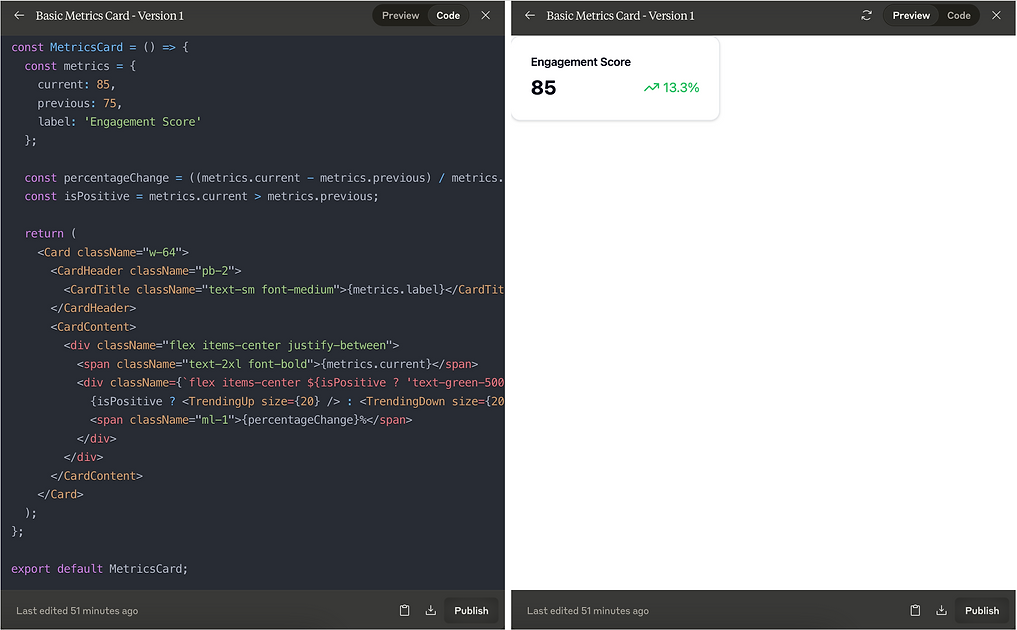
Version 1: Basic Metrics Display
- Shows current value and trend
- Simple, focused functionality
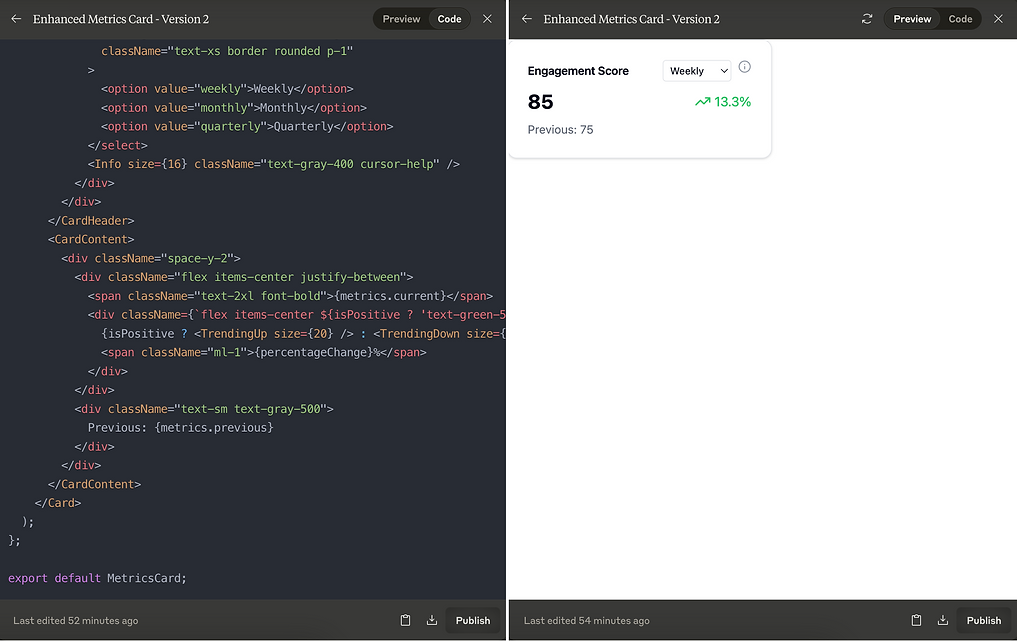
Version 2: Enhanced Interaction
- Added timeframe selection
- Enhanced data display
- Maintained core functionality while adding new features
For best results :
- Create new versions when adding state or major features; update existing ones for styling and minor enhancements
- Start with core functionality in v1, then iterate with clear version names (component-name-v1, v2)
- Test interactive features within the artifact before moving forward - what works in code may feel different in use
- Comment key decisions and assumptions - they'll help guide future iterations
Code Artifacts: Your Function Factory
This is where your algorithms and utilities come to life. Whether it's Python, JavaScript, or any other language, you get a clean slate for writing and refining code.
Ideal for:
- Iterating on code that evolves
- Data processing functions
- Utility libraries
- API integrations
Example Scenario: Let's explore this through building a sales data processor that evolves based on expanding needs. The sales processor is meant to handle revenue and profit calculations.
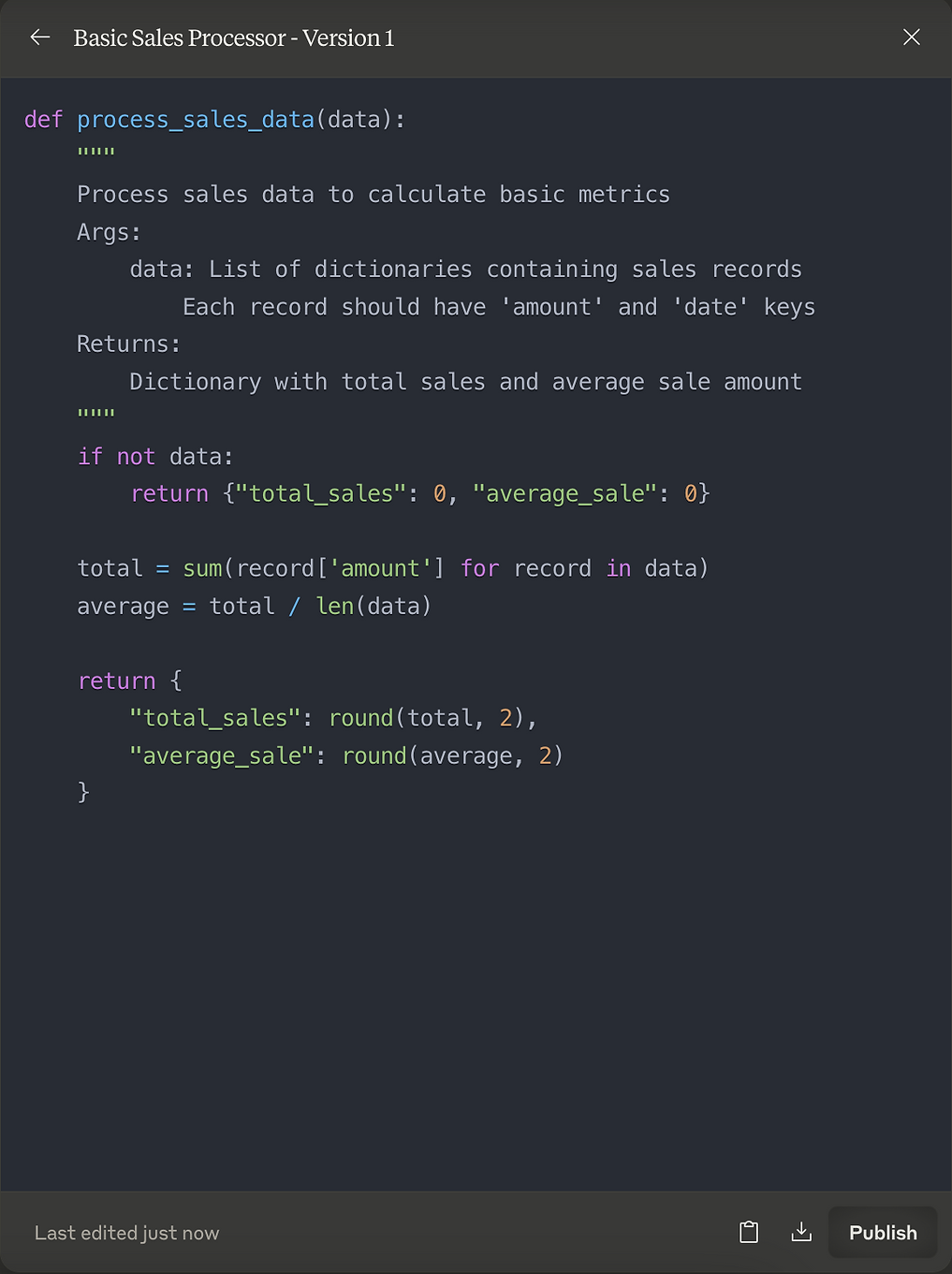
Version 1: Basic Sales Processor - We start with a focused function that handles essential sales calculations:
- Calculates total and average sales
- Includes basic error handling
- Returns simple, clear metrics
- Documented with basic usage guidelines
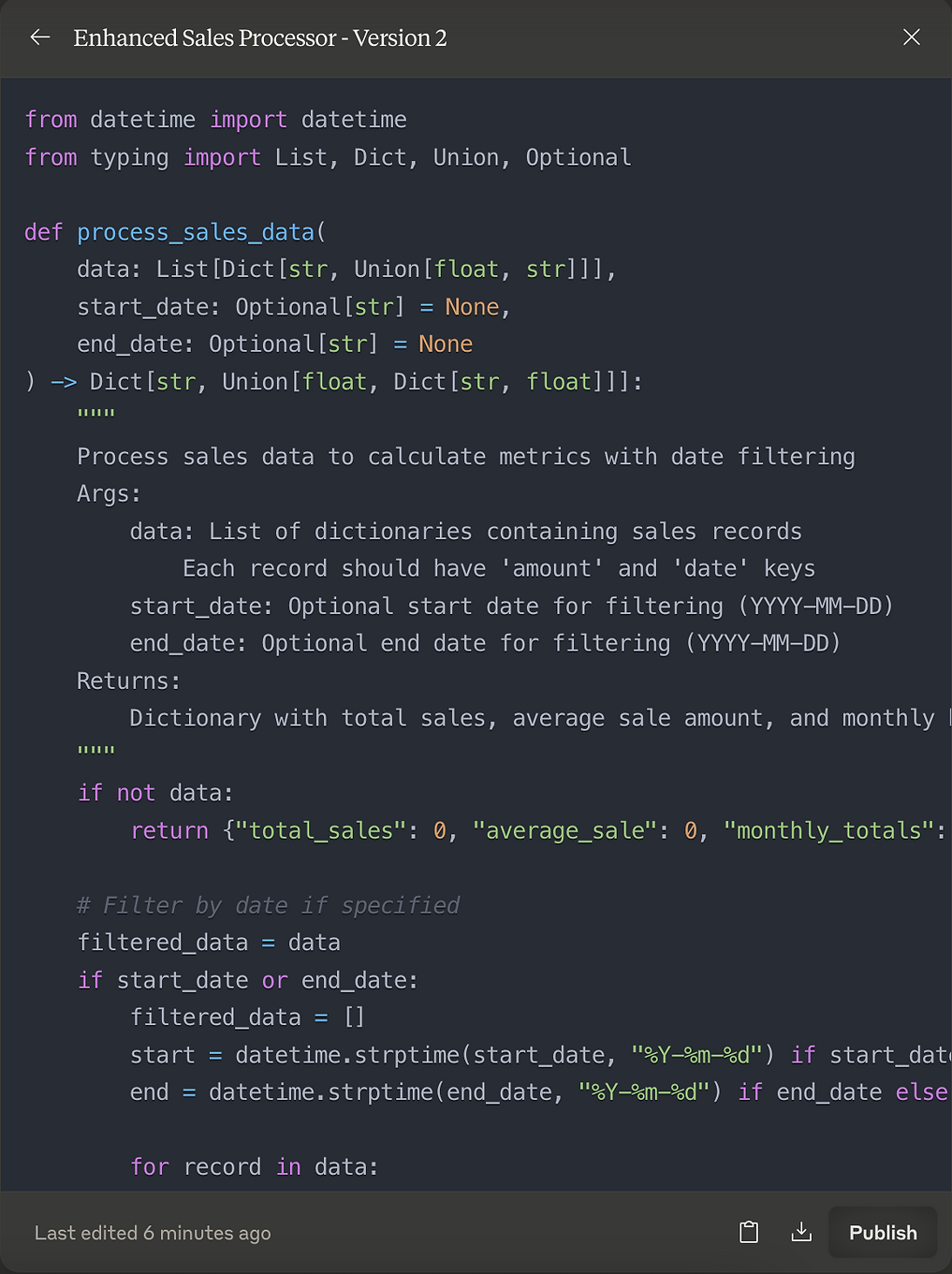
Version 2: Enhanced Functionality
- Added date filtering capabilities
- Includes monthly breakdowns
- Enhanced type safety and documentation
For best results:
- Create new versions when changing interfaces or adding major features; update existing ones for optimizations and fixes
- Start with core functionality, then expand based on specific needs
- Keep functions focused - split into new artifacts if handling multiple distinct tasks
- Add clear documentation from the start - it guides development and future use
SVG Graphics: Your Visual Design Studio
Think of this as your digital drawing board where you can create and refine scalable graphics that look crisp at any size. SVG artifacts are perfect for creating everything from simple icons to complex data visualizations.
Ideal for:
- Custom icons and logos
- Data visualizations
- Interactive diagrams
- Responsive illustrations
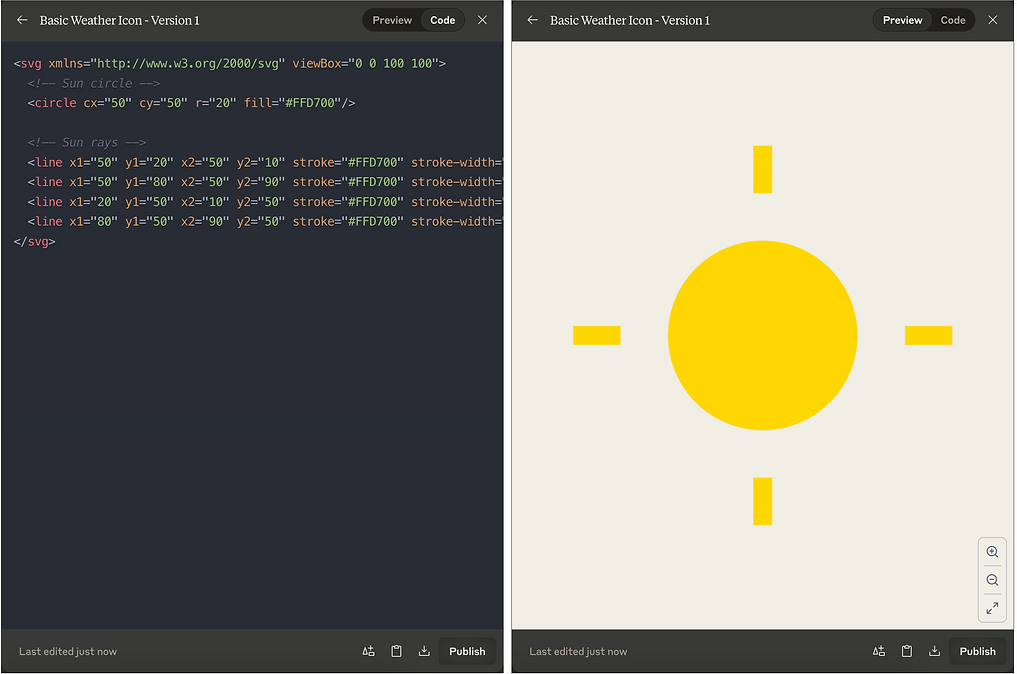
Example Scenario: Let's say you are creating a weather icon system that evolves from basic shapes to a more sophisticated design.
Version 1: Basic Weather Icon. First, we'll create a simple sunny day icon using basic SVG shapes. This version establishes:
- Basic shape structure
- Clear viewBox for scaling
- Simple color scheme
- Consistent stroke widths
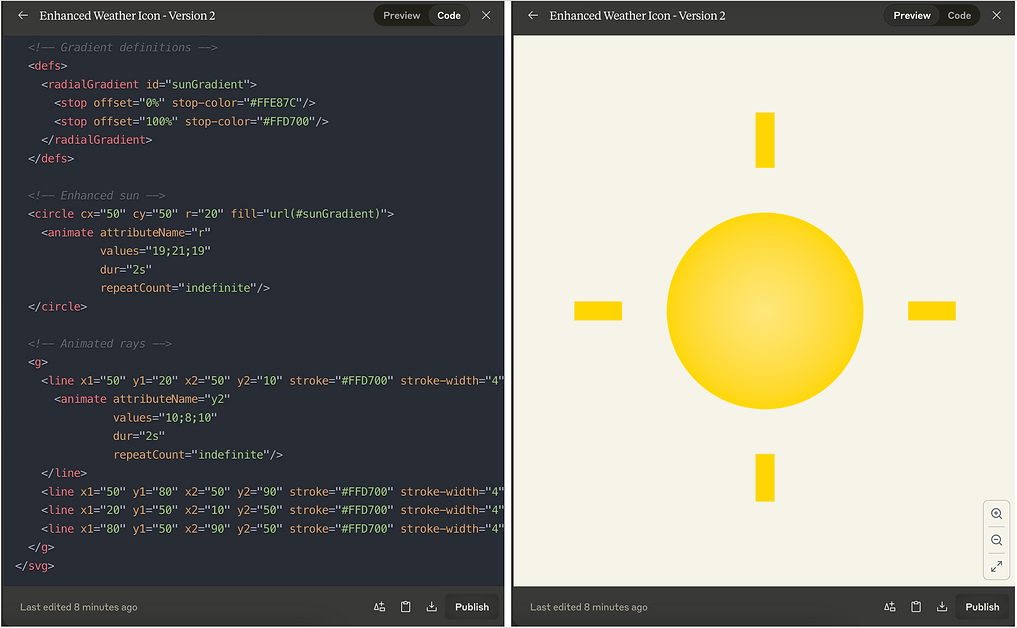
Version 2: Enhanced Weather System. We then evolved it into a more sophisticated system with gradients and animations in the "enhanced-weather-icon" artifact. Key enhancements include:
- Added gradient effects for depth
- Improved structure with grouped elements
- Prepared for system expansion
For best results:
- Start with a clear viewBox that accommodates your design
- Use groups (<g>) to organize related elements
- Keep IDs unique and descriptive for gradients and animations
- Test scaling behavior at different sizes
- Comment complex paths or animations for easier maintenance
Mermaid Diagrams: Your process visualization workshop
Think of this as your dedicated space for mapping out workflows, sequences, and relationships. Mermaid artifacts excel at turning text descriptions into clear, professional diagrams that help visualize complex processes and systems.
Ideal for:
- Flow charts and process diagrams
- System architecture diagrams
- Git branch visualization
- Gantt charts for project planning
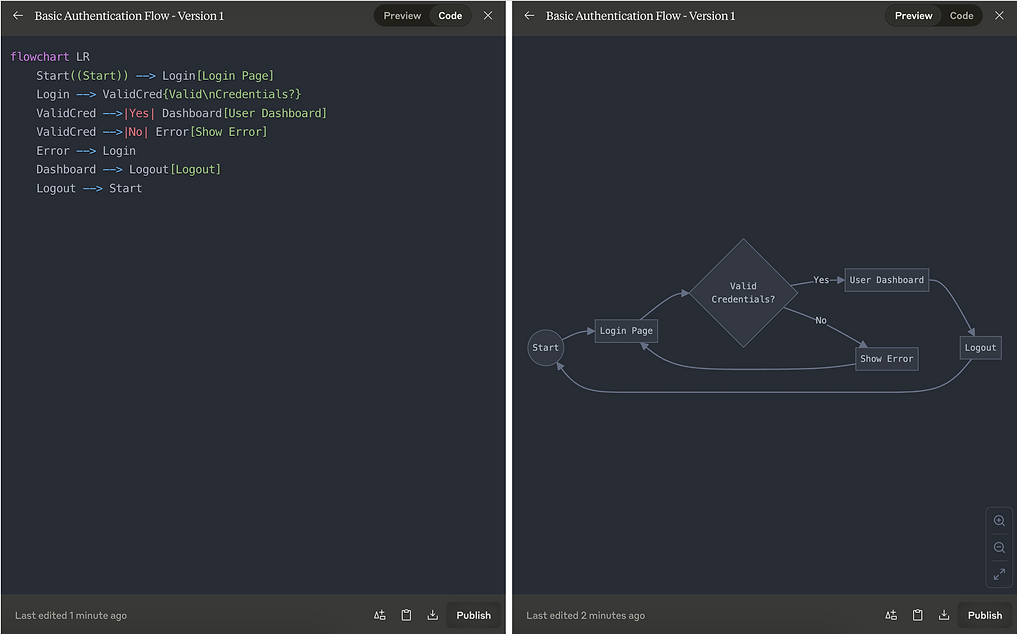
Example Scenario: Let's walk through creating an authentication system diagram that evolves from a basic login flow to a comprehensive security system. We'll see how the diagram grows while maintaining clarity.
Version 1: Basic Authentication Flow. Our first artifact ("auth-flow-basic") demonstrates a simple login flow that covers the essential path of user authentication:
- Clear entry and exit points
- Basic credential validation
- Error handling
- Logout functionality
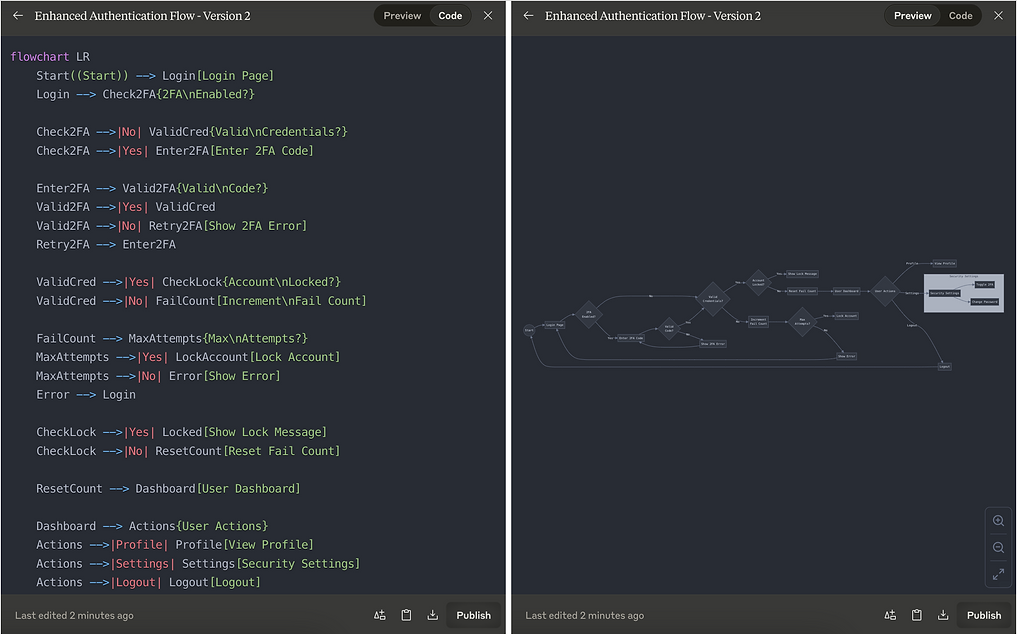
Version 2: Enhanced Security Flow. The second artifact ("auth-flow-enhanced") evolves the diagram to include:
- Two-factor authentication (2FA)
- Account locking mechanism
- Failure counting and maximum attempts
- Extended user actions and settings
- Subgraph for security settings
For best results:
- Test small sections of complex diagrams separately before combining them - Mermaid syntax errors can be tricky to debug in larger diagrams
- When updating a diagram, copy the entire artifact content rather than trying to describe changes in natural language
- Use line breaks (\n) in node text sparingly - they can make diagrams harder to maintain
- Remember that Mermaid artifacts don't require code blocks or backticks - put the Mermaid syntax directly in the artifact
- Keep artifact identifiers descriptive (like "auth-flow-v1") to make them easier to reference and update later
- When experimenting with new Mermaid features, create a new artifact instead of updating an existing one - this makes it easier to roll back if needed
Pro Tips
- Start and name With Purpose: Create artifacts when you have clear requirements - "user-metrics-dashboard-v1" tells a better story than "component1"
- Plan for Evolution: As we saw with both our React dashboard and sales processor, your needs will expand - structure your artifacts with future iterations in mind
- One Task, One Artifact: Like our sales processor that focuses solely on sales analysis, keep each artifact focused on a single responsibility
- Document Decisions: Include clear comments about your choices and assumptions - they provide context for future versions
- Build Gradually: Start with core functionality (like our basic metrics display) before adding complexity (like timeframe filtering)
Considerations
- Know Your Boundaries: Different artifact types have specific limitations - React components have set libraries, SVGs need specific structures
- Keep It Simple: Not every piece of code or diagram needs an artifact - use them for content that benefits from dedicated space and iteration
- Version Thoughtfully: Create new versions for interface changes and major features; update existing ones for improvements and fixes
- Plan for Sharing: Published artifacts are public while conversations stay private - structure them to be useful standalone
Wrapping Up
Through our examples, we've seen how artifacts create dedicated spaces for complex work while keeping conversations focused. Whether you're building an evolving dashboard, developing a data processing function, or creating technical diagrams, artifacts help manage this complexity effectively.
Remember: Artifacts aren't meant for everything - they're tools for when you need space to build and refine. Start with something simple like our basic metrics display or sales processor, then iterate as you learn what works for your needs.
The best way to understand artifacts is to use them. Pick a straightforward project, create your first artifact, and experience how they can improve your workflow with Claude.