Use Perplexity 'Deep Research' for expert level research
Some questions deserve more than a quick answer. Whether you're researching for a blog, planning a campaign, or exploring a complex trend, you’ll eventually hit a moment where you need real depth. That’s where Deep Research shines — helping you generate expert-level reports in minutes, without ever leaving your flow.
What You’ll Learn in This Guide
- What Deep Research is and how it works
- How to toggle it on and off mid-conversation
- How to use Deep Research as part of a larger workflow
- How to craft high-quality prompts that yield better reports
- Real-world use cases across industries
- Exporting and sharing results
What is Deep Research?
Deep Research is Perplexity AI’s most powerful research mode. Instead of giving you a fast summary, it acts like a research assistant:
- It performs dozens of searches
- Reads hundreds of sources
- Reasons through the content
- And produces a well-structured, source-backed report — typically in under 4 minutes
This makes it ideal for complex questions, competitive analysis, trend mapping, and structured thinking.
But here’s the key difference: you don’t have to leave your conversation to use it. You can turn Deep Research on for depth, then switch it off to explore, reflect, or create — all in the same thread or Space.
Plans & Access
| Plan | Credits | Features |
| Free | 5 Deep Research queries/day | Full feature access, limited usage |
| Pro – $20/month | 300+ queries/day | Unlimited Deep Research, model switching, Spaces, file uploads |
| Enterprise | Unlimited | Team controls, admin tools, advanced integrations |
Using Deep Research in Your Workflow
You don’t need to treat Deep Research as a separate tool. You can use it mid-conversation, as part of your thinking process.
Step 1 – Turn Deep Research ON
- Go to Perplexity.AI and click the “Deep Research” button on
- Ask your big, structured question
- Example: “What are the top emerging content strategies for AI startups in 2025?”
Step 2 – Review the Research
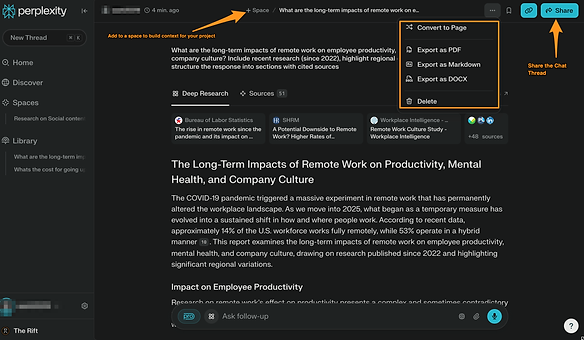
- Perplexity Deep Research takes some time to research and lists its tasks. You can choose to get notified when the research is done.
- As the research progresses, Perplexity adds sources you can review and tasks you can follow along with
- Explore the sources if needed
- Export or save the report if it's valuable
Once a report is generated, you can:
- Download as PDF for internal docs
- Publish as a Perplexity Page
- Share via link with colleagues or collaborators
- Copy excerpts directly into Spaces, documents, or follow-up threads
Step 3 – Turn Deep Research OFF
- Switch back to regular mode. Now you can use the findings to:
- Summarize in your own words
- Ask for formats like lists, slides, or outlines
- Continue the conversation with lighter follow-ups
- Example: “Turn the top 3 trends into an Instagram carousel post.”
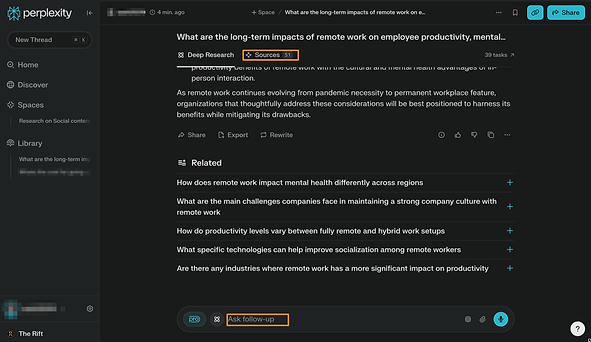
This toggle-on/toggle-off rhythm keeps you in flow — combining analysis and creativity in one place.
Crafting Great Deep Research Queries
The better the input, the stronger the report. Here’s how to write prompts that get expert-level results:
Ask a clear, focused question
Avoid: “Tell me about AI.”Use: “What are the major AI safety concerns raised in 2024 by global regulators?”
Add context or constraints
- Time: “...since 2021”
- Region: “...in Southeast Asia”
- Format: “...structured as a timeline and include citations”
Use structured formats
- “Compare OpenAI, Anthropic, and Google DeepMind on revenue and research focus.”
- “Provide a SWOT analysis of Tesla’s current position in EV markets.”
- “What’s the step-by-step impact of the EU AI Act on startups?”
Request comparisons or decision support
- “Which AI model is best for research-heavy workflows: Claude, GPT-4, or Sonar?”
- “List pros and cons of fine-tuning vs RAG for enterprise use cases.”
Follow up intelligently
- “Summarize the top 3 arguments and provide counterpoints.”
- “Now rewrite this for a C-suite audience.”
- “Create a 1-page brief from this report.”
Real-World Use Cases
Deep Research shines in multi-layered thinking and cross-domain exploration. Here are a few real scenarios:
- Market Intelligence
- “Compare Perplexity, You.com, and Arc Browser’s positioning in the AI search space.”
- Strategic Planning
- “What are the top trends shaping the future of decentralized social media?”
- Investor Briefs
- “Analyze OpenAI’s business model and its competitive risks in 2025.”
- Academic Review
- “Summarize the latest research on the neurological impact of cold exposure.”
- Content Strategy
- “What formats are driving highest engagement on LinkedIn for tech brands?”
Wrapping Up
Deep Research doesn’t just give you answers — it gives you confidence, speed, and structure. It’s your built-in analyst, capable of condensing hours of research into minutes.
And when used in flow with your conversation, it becomes even more powerful — helping you go from question → analysis → action in one continuous stream.
Next time you hit a research wall, toggle it on. When you're ready to build, toggle it off. Either way, you stay in control — and Deep Research keeps you thinking like an expert.
Knowledge Check
1 / 5Which of the following best describes the primary output of Perplexity's Deep Research mode?