What are AI or Agentic browsers?
Picture this: You have 15 tabs open. You're researching competitors, comparing products, taking notes, drafting emails, and trying to synthesize everything into a coherent strategy. Your browser has become a digital version of a messy desk—scattered documents everywhere, but no assistant to help organize or act on what you've found.
What if your browser could be more like a skilled research assistant? One that not only finds information but understands your goals, connects the dots across multiple sources, and can actually take actions on your behalf?
This is the promise of agentic browsing—transforming your browser from a passive document viewer into an intelligent collaborator that can see, understand, and act across the entire web.
What You'll Learn in This Guide
- What agentic browsers are and why they're revolutionary (not just evolutionary)
- How they work under the hood and what makes them different
- Real-world applications that will change how you work online
- Current options and which one fits your needs
- Practical tips for getting started and avoiding pitfalls
- Privacy considerations and honest limitations
- What's coming next and how to prepare
Introduction: From Tab Chaos to Digital Harmony
Think of it this way: Traditional browsers are like having a telescope—they help you see distant things clearly, but you still have to point them, interpret what you're seeing, and take all the actions yourself. Agentic browsers are like having a skilled research partner with that telescope—one who understands what you're looking for, can explore independently, and comes back with insights and completed tasks.
What Makes Agentic Browsing Revolutionary
The Traditional Web Experience: A Series of Manual Tasks
Currently, when you want to accomplish something online, you become a digital choreographer:
- You search for information across multiple sites
- You compare options, read reviews, check specifications
- You copy and paste data, take notes, remember context
- You fill forms, navigate checkout processes, coordinate between platforms
- You synthesize everything into decisions and actions
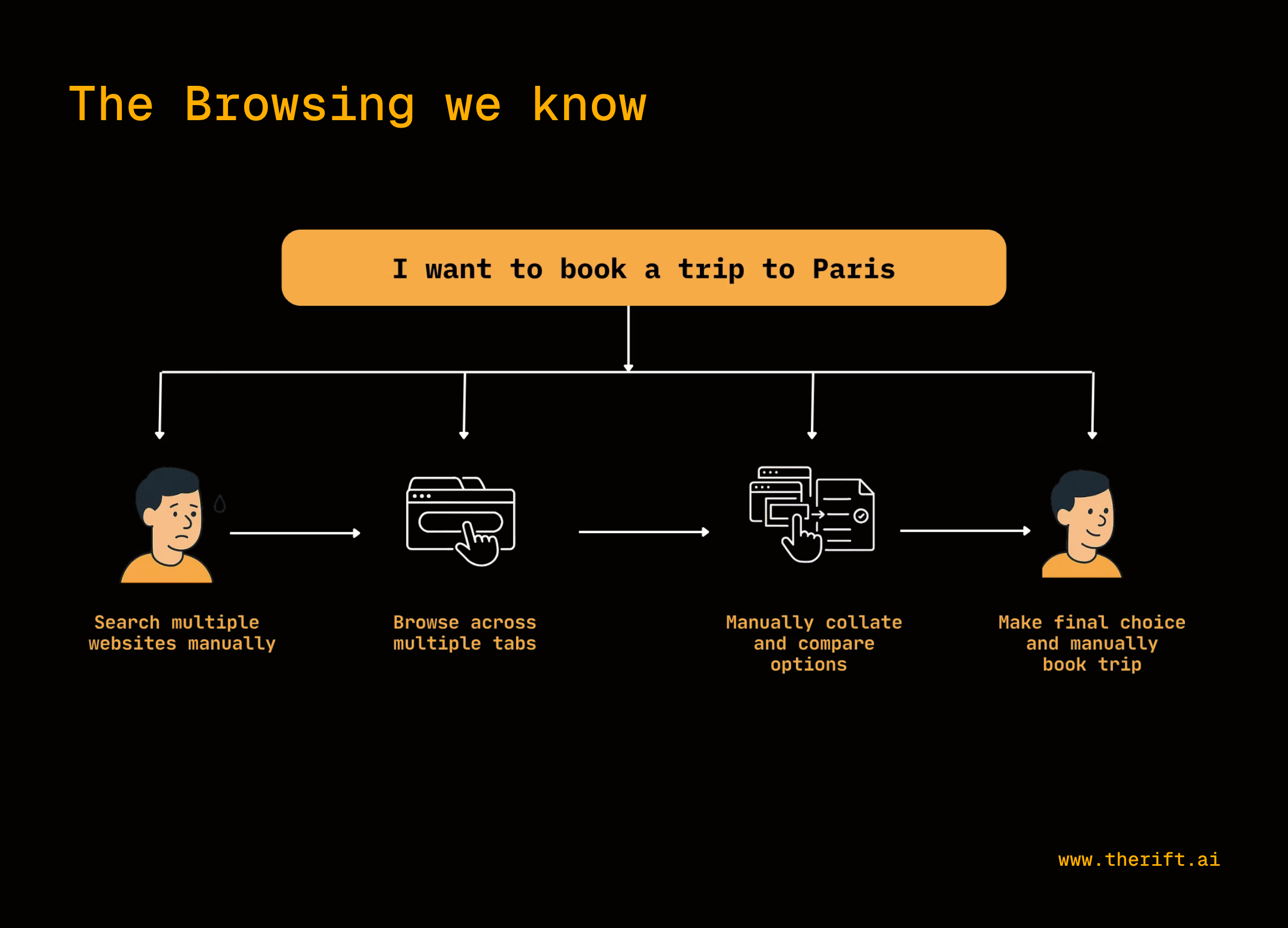
The Agentic Revolution: From Choreographer to Director
Agentic browsing flips this dynamic. Instead of choreographing every step, you become a director giving high-level instructions:
You say: "Find the best noise-canceling headphones under $300 for someone who travels frequently"
The browser: Searches multiple retailers, reads reviews, compares specifications, considers travel-specific features, and presents a reasoned recommendation with supporting evidence.
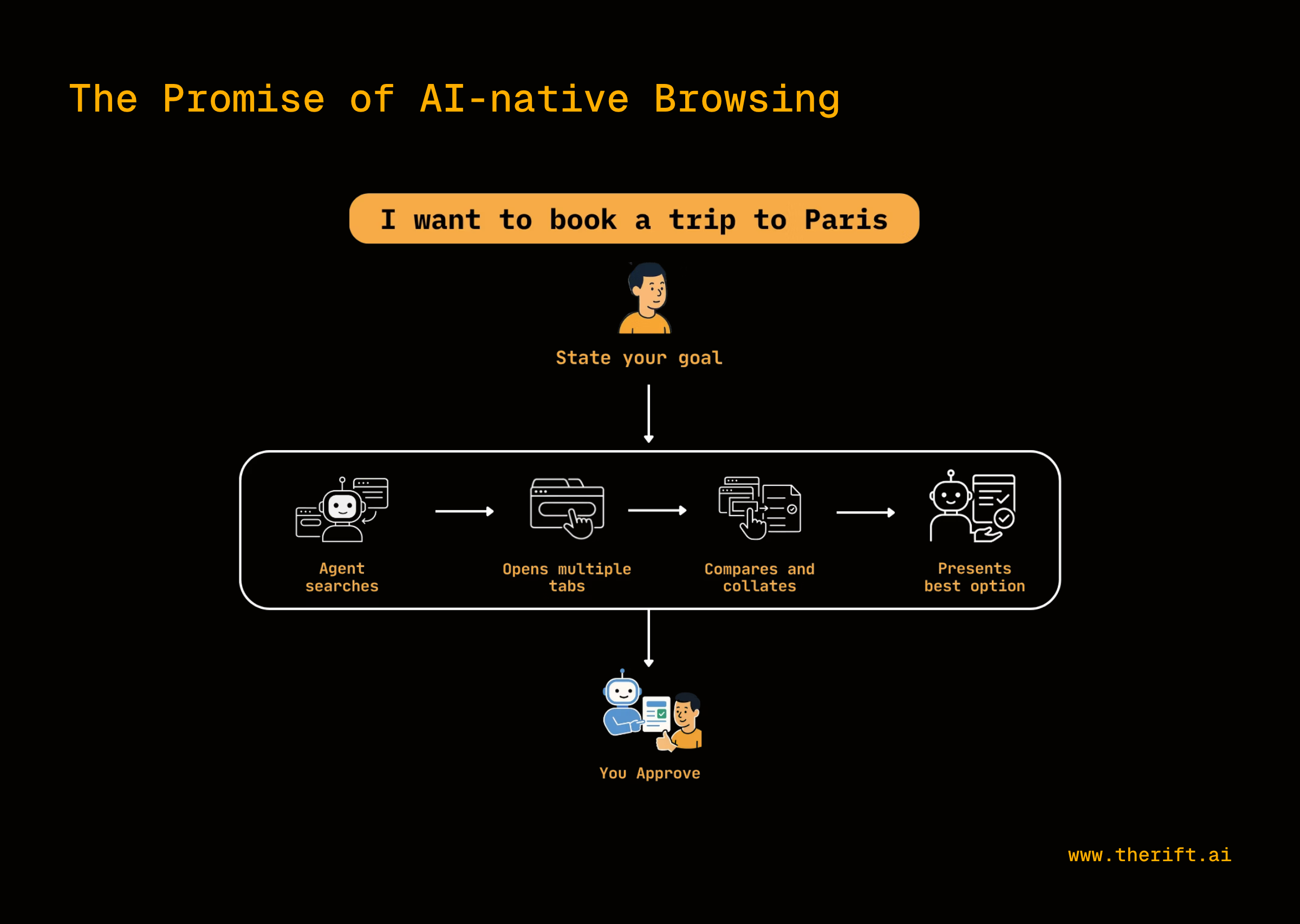
The key difference: The browser doesn't just find information—it understands your intent, makes decisions, and can take actions across websites autonomously.
Core Capabilities That Change Everything
Based on real implementations in DIA, Perplexity Comet, and Fellou, here are the four capabilities that consistently define the agentic browsing experience:
1. Multi-Tab Context Synthesis
What it actually does: The AI can "see" and understand content across all your open browser tabs simultaneously, then combine that information into coherent insights.
Real example from DIA: "Compare these mics for me, read the reviews and list known issues that users have encountered. Suggest the best option, i need for it to arrive fast”
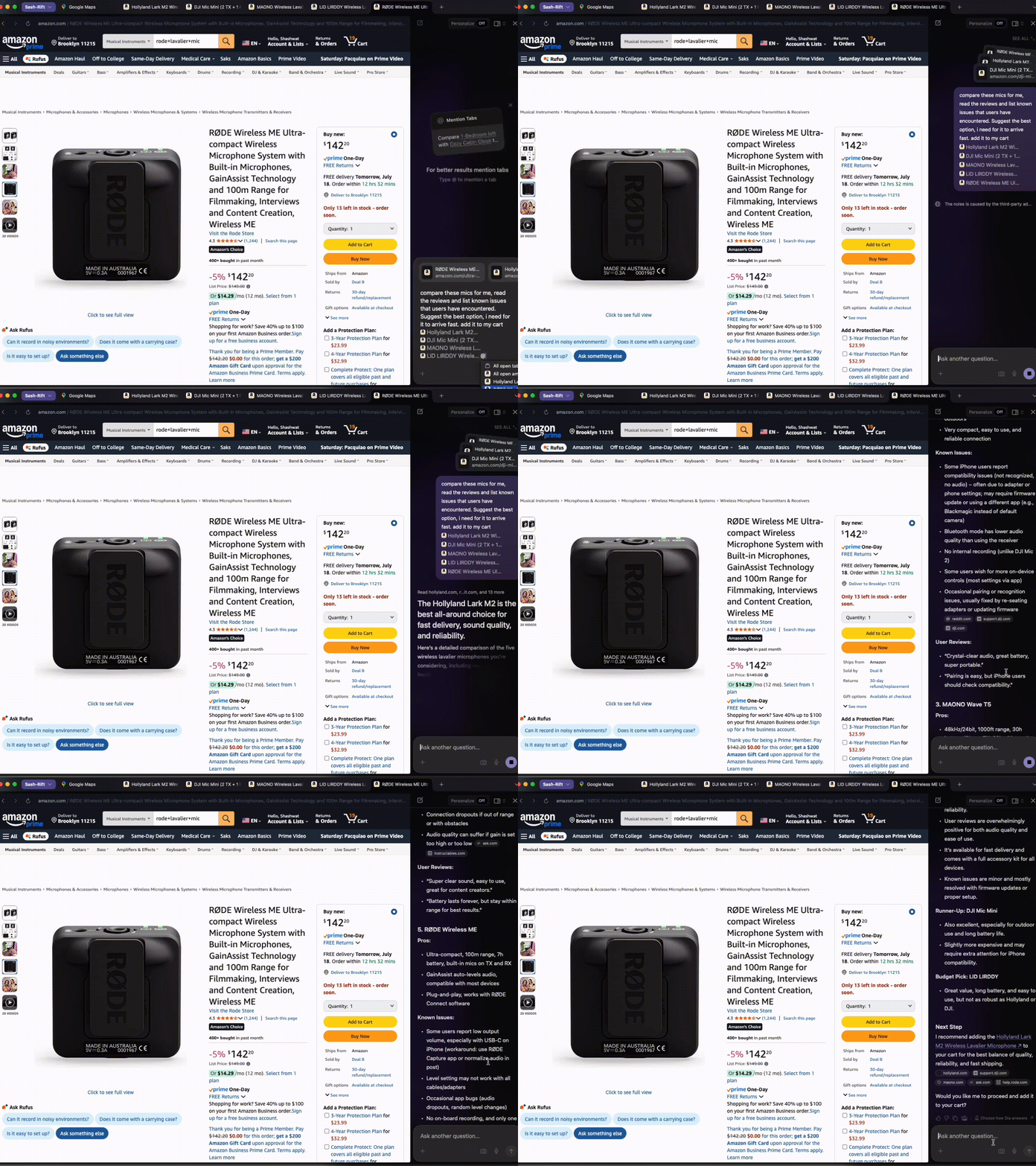
Why this matters: Instead of manually copying information between tabs and trying to remember details, you get instant synthesis of everything you're researching.
2. Contextual Conversation Across Sessions
What it actually does: The browser remembers what you were working on and maintains conversation context even when you switch between different websites and tasks.
Real example from Comet: "Find the last creatine i bought on amazon and buy a new one"
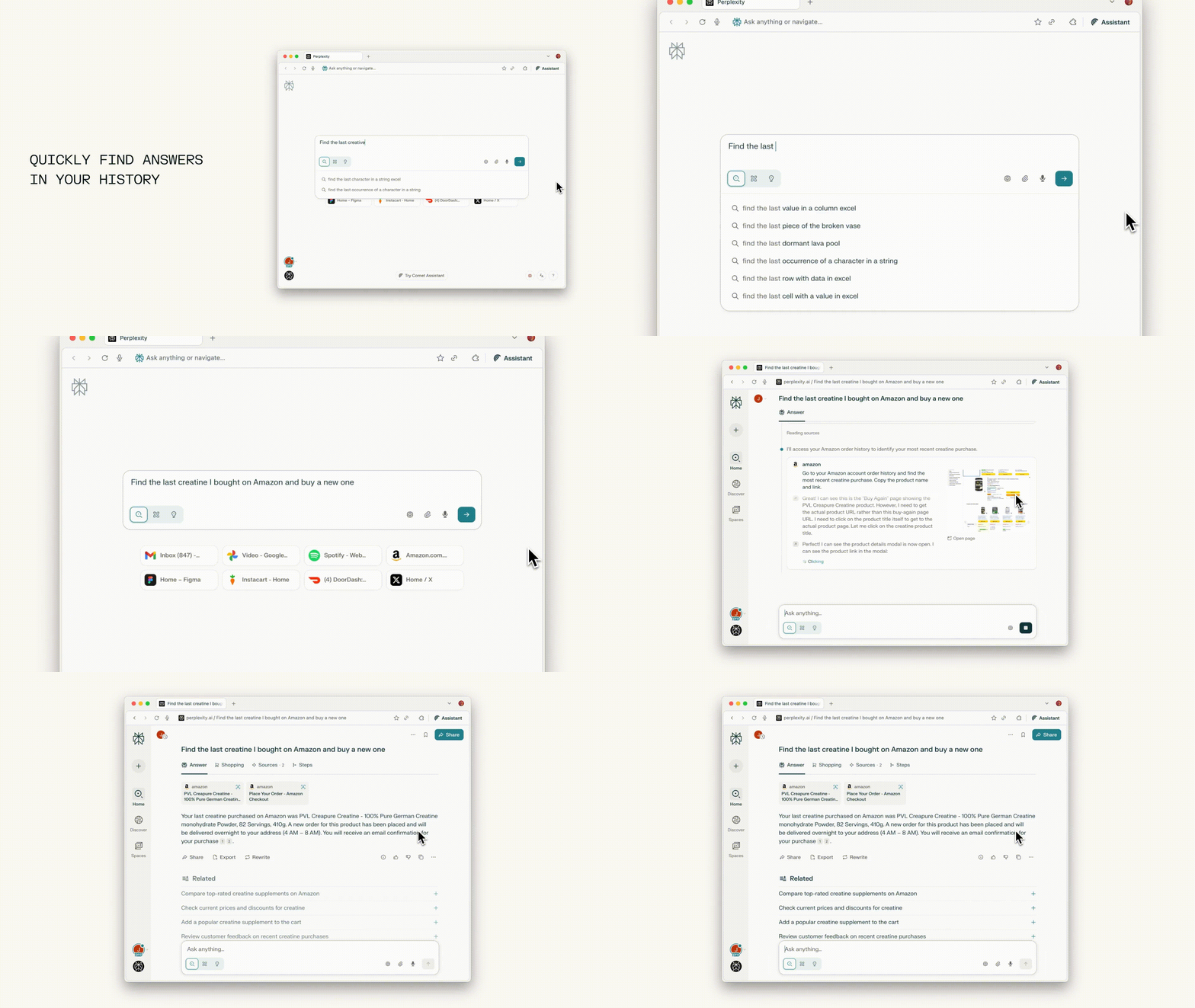
Why this matters: You can have ongoing "research conversations" without constantly re-explaining your goals or starting over.
3. Automated Workflow Execution
What it actually does: The browser can perform complete sequences of actions across websites - like filling forms, making purchases, or booking appointments - based on natural language instructions.
Real example from Fellou: "i want to cook shepherds pie with beef. Make me a grocery cart from the nearest store that delivers the quickest and give me a solid recipe to impress my friends.
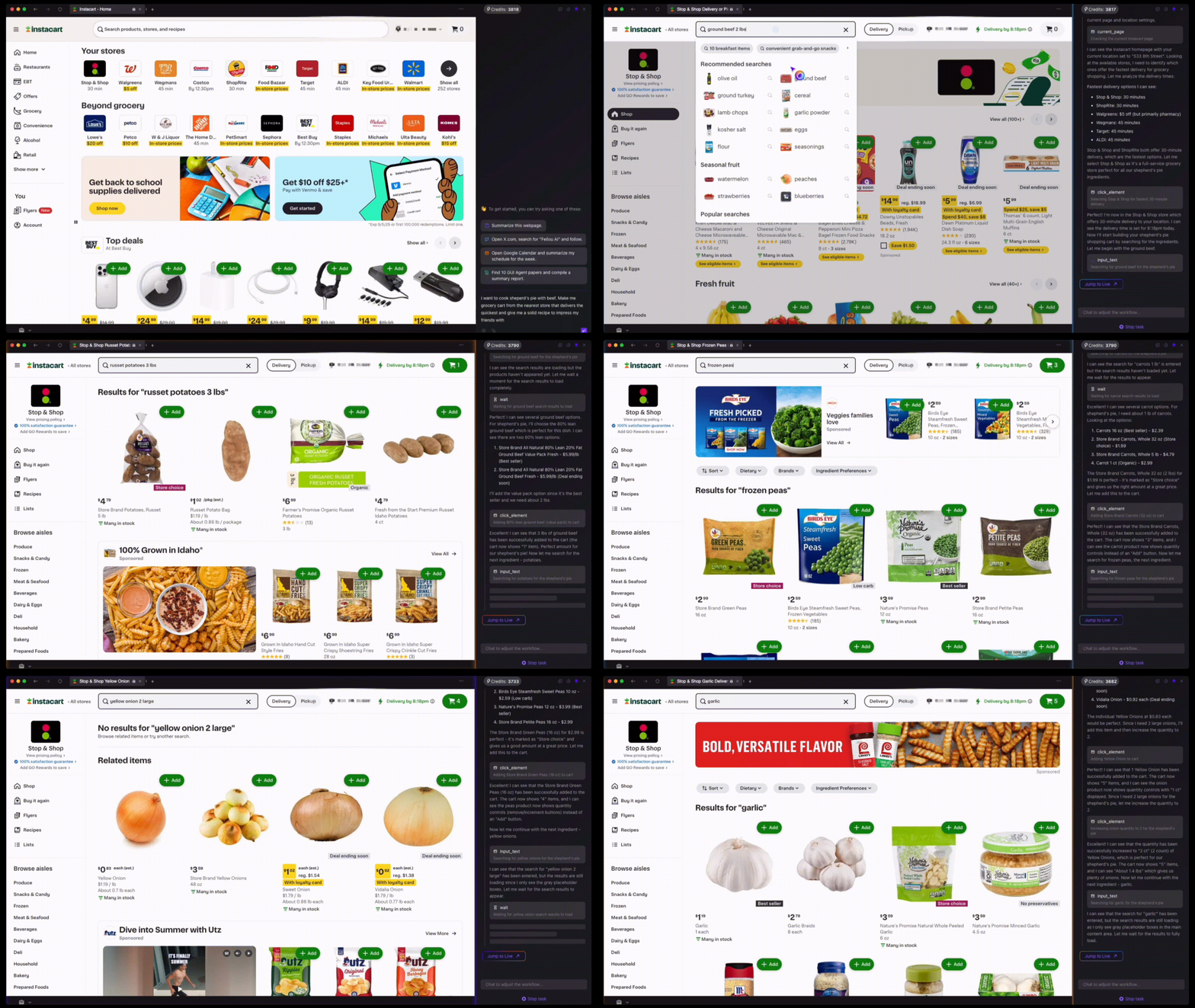
Why this matters: Complex online tasks that typically take 30 minutes of clicking and form-filling can be completed with a single instruction.
Real-World Applications: Where Agentic Browsing Shines
| Use Case | Traditional Method | Agentic Approach | Time Saved |
|---|---|---|---|
| Shopping Research | Hours of manual comparison across sites, reading reviews, checking specs | "Find the best noise-canceling headphones under $300" → reasoned recommendation with evidence | 2-3 hours → 15 minutes |
| Travel Planning | Juggling flights, hotels, activities across multiple tabs and platforms | "Plan a 5-day Tokyo trip avoiding tourist traps, using my rewards points" → complete itinerary with bookings | 4-6 hours → 30 minutes |
| Market Research | Manual data gathering, note-taking, and synthesis across dozens of sources | "Analyze the competitive landscape for AI translation tools" → structured competitive analysis | 8-10 hours → 1 hour |
| Content Creation | Switching between research and writing, managing sources manually | "Create a presentation about renewable energy trends" → sourced slides with citations | 3-4 hours → 45 minutes |
| Event Coordination | Multiple platform coordination for bookings, invites, logistics | "Organize a team offsite in Austin with food restrictions" → venue, catering, logistics handled | 2-3 hours → 20 minutes |
Current Market Leaders: Your Options in 2025
| Browser | Best For | Key Strengths | Notable Limitations | Pricing |
|---|---|---|---|---|
| DIA | First-time AI browser users | Simple interface, excellent chat with tabs, contextual assistance | Limited extension support, missing agentic features like live site navigation | Free beta |
| Perplexity Comet | Power users wanting research + automation, General Browsing | Multi-step workflows, advanced reasoning, real-world task execution | Occasional task failures in live site navigation, high subscription cost | Waitlist or Perplexity Max subscription ($200/mo) |
| Fellou | Visual decision-makers, researchers, General Browsing | Multi-agent workflow automation, visual report generation, complex task execution | Limited privacy details, early-stage development instability. High Credit uses | Waitlist - Uses Credits for all operations. |
| Opera Neon | Content creators, developers | Offline processing, creative tools, multiple AI modes | More creation-focused than general automation | Waitlist |
What's Coming Soon
- OpenAI Browser: Deep ChatGPT integration with "takeover mode" for secure web interactions • Google Chrome AI: Gemini-powered features and new "Web AI" standards • Microsoft Edge Copilot Mode: Experimental agentic features with natural language task automation
The Difference Between AI-Aided and Truly Agentic
Many browsers now offer "AI features," but there's a crucial distinction:
| Dimension | AI-Aided Browsing | Truly Agentic Browsing |
|---|---|---|
| Your Role | Driver making all decisions | Director setting objectives |
| AI's Role | Assistant providing suggestions | Autonomous agent taking action |
| Interaction Style | You ask, AI answers | You instruct, AI executes |
| Task Scope | Single actions or queries | Complex multi-step workflows |
| Decision Making | Every choice requires your input | Makes informed decisions within your parameters |
| Examples | Chrome's AI search summaries, Edge Copilot suggestions | DIA's research workflows, Perplexity Comet's task automation |
| Value Proposition | Browse faster | Get things done while you focus elsewhere |
Think of it like this: AI-aided browsing is like having a very smart search engine that can also chat. Agentic browsing is like hiring a skilled digital assistant who can work independently while you're in a meeting.
Honest Talk: Current Limitations & Real-World Issues
While agentic browsers promise a revolutionary experience, they face several significant challenges today:
- Limited Reliability: Even advanced implementations only achieve 60-70% success rates on complex workflows
- Performance Issues: Slower speeds, occasional crashes, and laggy animations, especially on older hardware
- Interface Challenges: Agents struggle with human-designed web interfaces, missing hidden elements and interactive components
- Cost Barriers: High subscription prices and limited availability restrict widespread adoption
Privacy & Security Concerns
- Data Processing: Requires processing vast amounts of personal browsing data
- Credential Access: Browser agents need access to sensitive information, creating potential security vulnerabilities
- Unclear Privacy Policies: Many platforms don't adequately explain how your data is processed, stored, or shared
When to Wait Instead of Adopting
You should probably wait if:
- Your browsing needs are simple (news, social media, basic research)
- You're uncomfortable with AI processing your browsing data
- You need 100% reliability for mission-critical workflows
- Budget constraints make premium subscriptions prohibitive
- You're not ready to invest 1-2 weeks learning new workflows
The Future: Next 2-5 Years
| Timeframe | Key Developments |
|---|---|
| 2025-2026 | Enhanced reliability & error recovery • Mobile-first agentic browsers • Enterprise security frameworks • Mainstream platform availability |
| 2026-2027 | Multimodal intelligence (visual + audio + text) • Cross-application coordination • Sophisticated personalization systems • Industry standardization |
| 2028-2030 | Ambient intelligence with proactive assistance • Complex problem decomposition • Multiple reasoning paths • Web standards evolution for AI-native interfaces |
The Bigger Transformation: We're moving toward an AI interface era where users speak requests to agents that search, filter, and deliver results—eliminating traditional tabs, clicking, and scrolling entirely.
Key Takeaways
The revolution is real but early-stage. Agentic browsers represent a genuine shift toward outcome-based computing, though current implementations face significant limitations. Early adopters gain productivity advantages while helping shape the technology's evolution. Start experimenting now with realistic expectations about current capabilities, but prioritize privacy by understanding data processing before committing to any platform.
The question isn't whether this transformation will happen, but how quickly you want to start benefiting from it—while remaining mindful of the genuine limitations and privacy considerations that exist today.