What is Perplexity? A Beginners Guide
Perplexity AI is a modern answer engine designed to make online search faster, smarter, and more useful. Instead of giving you a list of links like traditional search engines, it delivers direct, well-sourced answers using real-time web data and large language models. Whether you're researching a topic, comparing opinions, or summarizing documents, Perplexity offers a more efficient and trustworthy experience.
What You’ll Learn in This Guide
- What Perplexity AI is and how it works
- The difference between free and paid plans
- How to use key features like focus modes, Spaces, and file uploads
- What AI models power Perplexity and when to use them
- Pro tips to get better answers, faster
What You Can Use Perplexity For
- Smarter Searching – Instead of sifting through pages of links, Perplexity gives you direct answers with clickable citations. It’s perfect for quick, credible overviews or deep dives.
- Research and Summarization – Upload up to 3 files per day for free (PDF, DOC, CSV), and ask questions about their contents. Pro users get unlimited uploads and can analyze large documents easily.
- Content Exploration – Discover trending academic papers, social media discussions, and news in one place using modes like Academic, Social, and Video. This makes Perplexity especially strong for staying informed across domains.
Key Features Overview
Perplexity offers a powerful set of tools that make search more interactive, transparent, and versatile:
- Focus Modes – Choose from Web, Academic, or Social to tailor how Perplexity interprets your query and surfaces content.
- Web Search with Citations – Results are grounded in up-to-date information pulled directly from live sources. Ideal for current events, new research, or product comparisons.Every response includes numbered citations that link to the exact article or study used in the answer.
- Follow-up Questions – Ask follow-ups directly in the same thread to refine results. The AI remembers context, making conversations feel natural.
- Spaces – Create dedicated research folders for different topics. Spaces support collaboration, note-taking, and file storage.
- File Analysis – Upload PDFs, CSVs, or DOCs. Ask questions like "What are the key findings in this report?" Free users can upload 3 files/day, while Pro users get unlimited uploads.
- Pro Search - Pro search is an advanced feature that goes beyond free auto search and conducts in-depth research. Auto mode gives you fast, reliable answers. Pro search gives you more. Pro search also has a code-interpretor.
- Perplexity Pages – Convert any research thread into a well-formatted article for sharing. Pages preserve structure and sources for easy export.
- Deep Research - Advanced research feature that conducts in-depth research and analysis on your behalf, saving you hours of time. Great for researching with reasoning, report writing and expert analysis.
Pricing Plans
Perplexity offers flexible pricing that scales from casual users to enterprise teams. Here's how the plans compare:
| Plan | Free Plan | Perplexity Pro ($20/month) | Enterprise Pro ($40/month/user or $400/year/user) |
| Search Access | Unlimited quick, 5 Pro searches/day | 300+ Pro searches/day | Extended Pro Search for in-depth research |
| File Uploads | 3 per day | Unlimited | Unlimited |
| AI Model Access | Fast AI model only | GPT-4o, Claude 3.5, DeepSeek R1, Sonar models | Custom models, advanced access |
| API Credits | None | $5/month included | Higher allocation, team-level integration |
| Knowledge Hubs | No | Yes | Integration with internal company knowledge bases |
| Collaboration | No | Custom Spaces, shared research | Admin tools, user management, collaboration spaces |
| Security | Basic privacy | Incognito mode, encrypted data | SOC2 compliance, enterprise-grade security |
You can upgrade your plan directly on the Perplexity.ai website by creating an account and selecting a subscription tier that fits your needs.
AI Models Available in Perplexity
Perplexity lets users (especially Pro subscribers) choose from several advanced AI models to suit different tasks. Here's a quick overview of the key models and what they do best:
| Model | Description | Best For |
| GPT-4o | OpenAI’s latest flagship model with fast, smart answers | Research, Writing, Coding and General Purpose Tasks |
| Claude 3.7 Sonnet | Anthropic’s most advanced model | Research, Writing, Coding and General PurposeTasks |
| DeepSeek R1-1776 | Chinese open model optimized for logic and reasoning | Chain-of-thought answers, technical questions and complex reasoning |
| Sonar | Perplexity’s own search-focused model with grounding | Deep search with strong citations |
| Gemini 2.5 Pro | Google's latest General purpose model | Research, Writing, Coding and General PurposeTasks |
| Grok-2 | xAI's latest model | Web Research, Writing, Coding and General PurposeTasks |
| Claude 3.7 Sonnet Thinking | Anthropic's latest reasoning model | Chain-of-thought answers, technical questions and complex reasoning |
| o3-mini | OpenAI's Chain-of-thought reasoning model | Chain-of-thought answers, technical questions and complex reasoning |
Focus Modes Explained
Perplexity’s Focus Modes help you get more relevant answers by customizing the type of sources and reasoning used based on your intent. Whether you’re researching academic papers or summarizing a video, picking the right mode sharpens the output:
| Mode | Purpose | Best Used For |
| Web | Default internet-wide search | General info, news, everyday questions |
| Academic | Scholarly content and journals | Research papers, studies, citations |
| Math | Focuses on mathematical calculations and computational data | Calculations, algebra, step-by-step math |
| Social | Focused on trends across social media | Reddit/X/TikTok trend summaries |
Choose a mode by clicking the Focus button before entering your query.
How to Use Perplexity: Step-by-Step
Step 1 - Visit Perplexity.ai
You can begin searching immediately — no account needed.
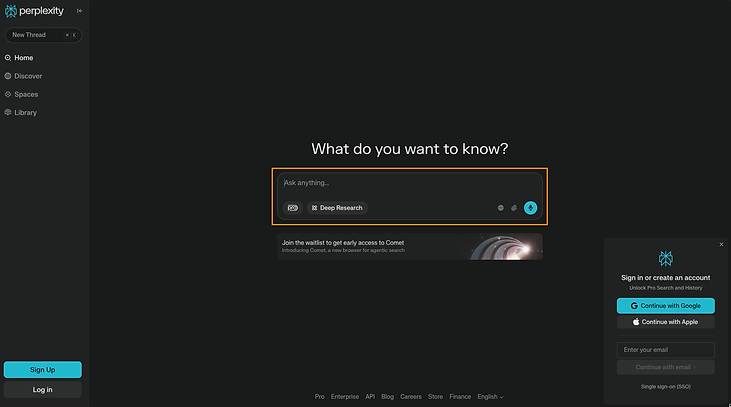
Step 2 - Create a Free Account (Optional, but Recommended)
To access more features:
- Choose "Sign-in"in the bottom-right corner
- Once signed in, you get access to chat history, 3 enhanced queries a day (pro and deep research) and spaces
Step 3 - Pick a Focus Mode
- Click globe icon near the search bar and choose from Web, Academic, and Social
Step 4 - Ask a Question
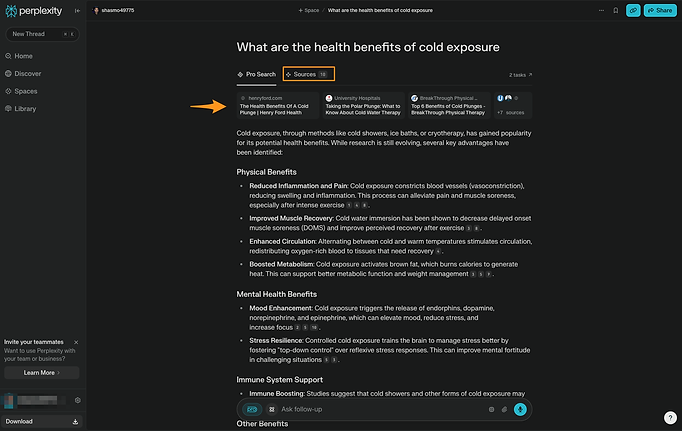
Type a natural language question like - "What are the health benefits of cold exposure?" Perplexity will provide a structured answer and provide sources
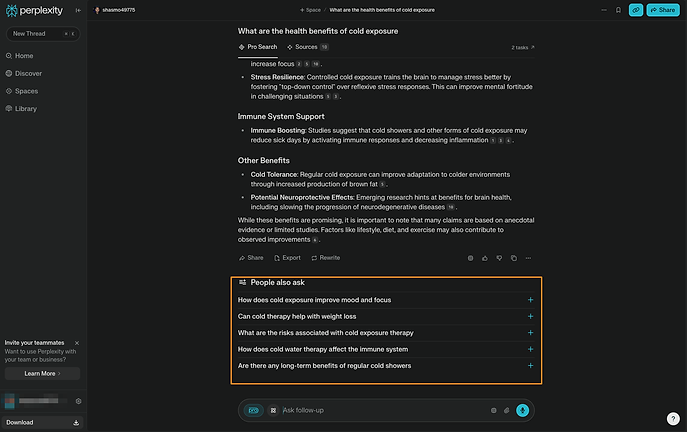
It also suggests follow-up questions that others have asked
Step 5 - Explore, Save, or Share
You can ask it follow up questions like you are having a conversation.
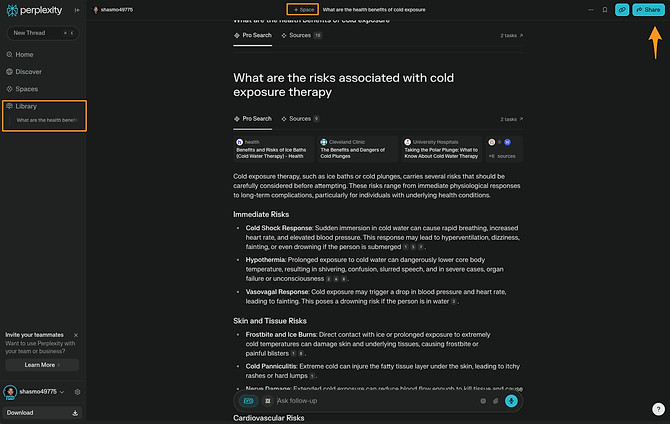
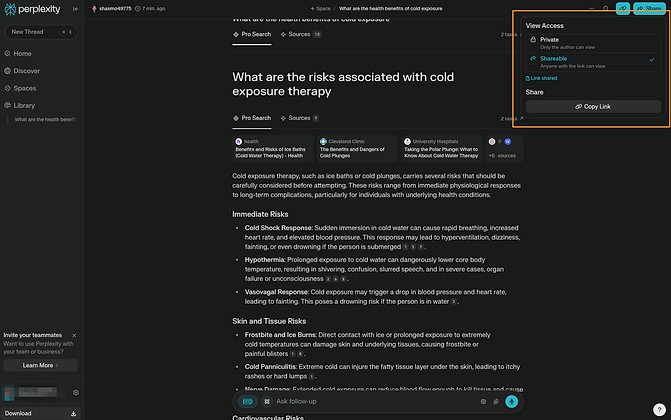
You also have the option to share the conversation with your friend. They will receive the entire chat history. You can come back and find all your chats under 'Library' in the left pane.
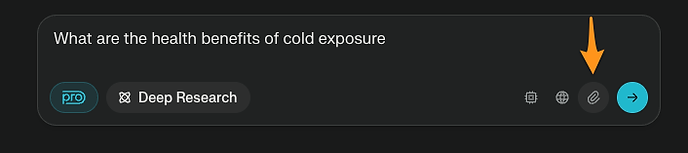
Step 6 - Upload and Analyze Files (Pro Feature)
You can upload documents and files and ask questions about the file. For Ex - You can upload a research paper and ask perplexity to summarize, or add technical documents and research them by asking it questions
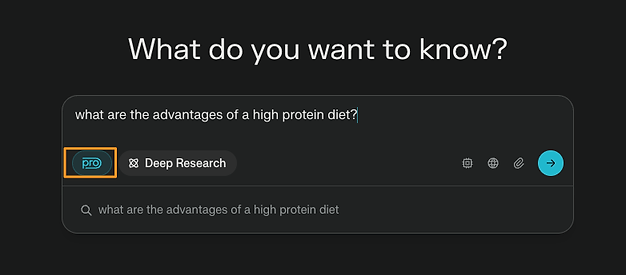
Step 7 - Pro search
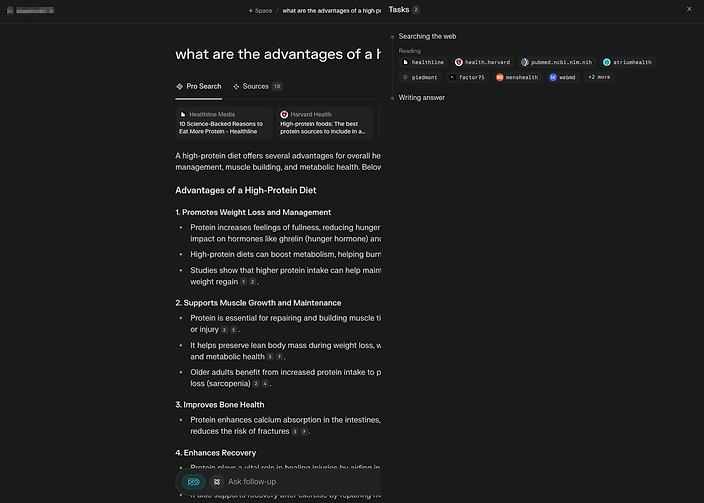
Pro Search asks clarifying questions to hone in on what you're really looking for, eliminating irrelevant information.Its responses compile the best insights from a wide range of sources and links
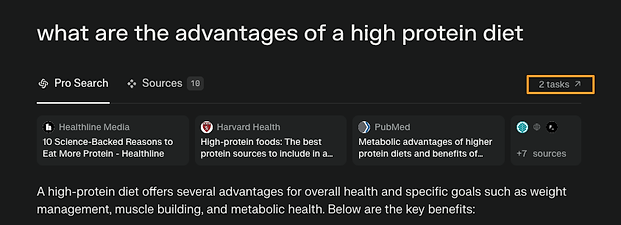
Once your query is being responded to, click on tasks and you can see the thinking process behind pro search
Step 7 - Deep Research
Deep Research is Perplexity's advanced research feature that conducts in-depth research and analysis on your behalf, saving you hours of time. It's free for all users, with limited daily usage for non-subscribers.
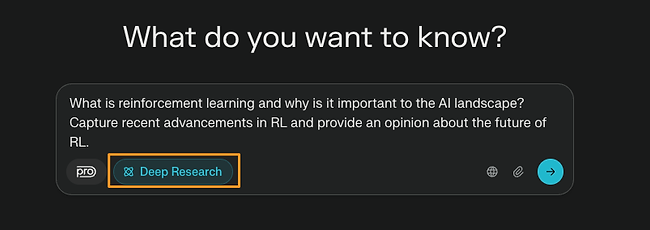
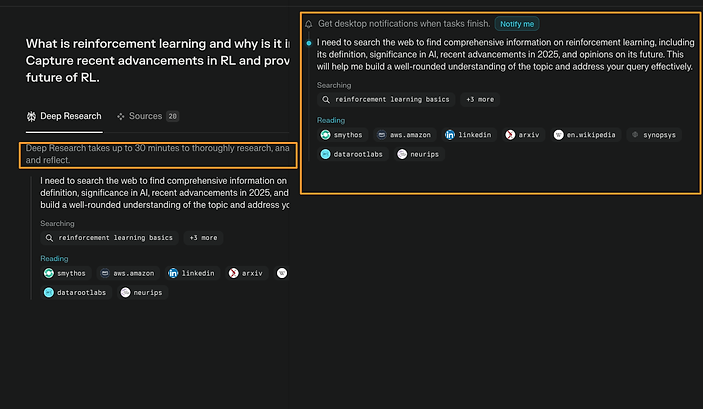
Depending on the topic, deep research could take time. You can choose to get notified once the research is done
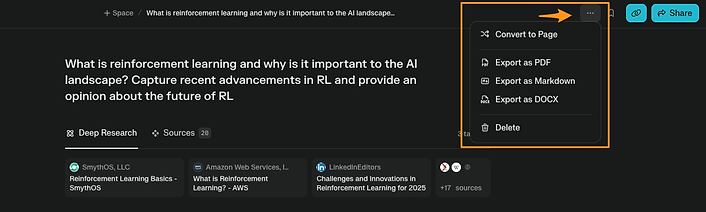
Once the task is complete, you can click on the three dots on the top and choose to save it as a Perplexity page or a document. You can do that with all Perplexity chats, not just Deep research.
Pro Tips
- Use Spaces strategically – Create separate Spaces for each project or theme to keep research organized. You can store documents, threads, and notes in one place.
- Switch models based on intent – Use GPT-4o or Claude 3.5 for writing, and Sonar-Pro for research-heavy tasks. Changing the model can dramatically affect response quality.
- Pin and organize threads – In your Library, pin important threads and add titles so you can return to them later without digging.
- Ask meta-questions – Try queries like "What follow-up questions should I ask about this topic?" to expand your understanding.
- Use the Discover tab to explore new angles – It’s curated to surface current and high-value content across domains — a great place to start when you’re not sure what to ask next.Create Spaces to track and organize long-term research
Wrapping Up
Perplexity AI is more than a search engine. It’s a personal research assistant that blends the power of LLMs with real-time information and proper attribution. Whether you're writing a report, solving a math problem, or staying on top of a fast-moving topic, it gives you answers that are fast, sourced, and usable.
As AI search evolves, tools like Perplexity could become the new standard for how we access knowledge on the web. Try it out, ask it something meaningful, and see what happens next.
Knowledge Check
1 / 5What is the primary difference between Perplexity AI and traditional search engines, according to the guide?